12. Packs (.pfapack)
A pack is a portable library of PFA events: one file containing event definitions in full editable form, the raw source samples, and a generated README with integration snippets. Packs are how you ship a footsteps library, hand a colleague your UI kit, or sell curated event sets — the buyer imports the pack, tweaks anything, and bakes it with their export.
12.1 Exporting a pack
Right-click in the event tree:
- an event → Export as Pack… (Tier 1 — single event), or
- a group → Export Group as Pack… (Tier 2 — the natural unit: a whole footsteps set, a UI kit).
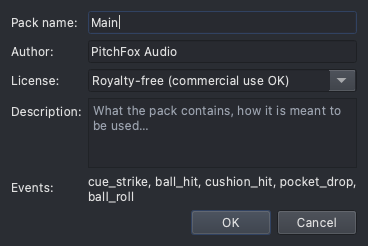
The metadata dialog:
| Field | Notes |
|---|---|
| Pack name | Pre-filled from the event/group name |
| Author | Persists across projects — type it once |
| License | Pick or type: CC0, CC-BY 4.0, Royalty-free (commercial use OK), All rights reserved, or your own |
| Description | "What the pack contains, how it is meant to be used…" |
| Events | Read-only summary of what's going in |
Save as <name>.pfapack. The status bar reports events and samples packed.
What goes inside:
- events in project form — clips, fades, variations, spatial, intensity, node graphs, stingers, sub-levels — fully editable after import;
- raw source samples (WAV as you authored them), deduplicated;
- an auto-generated README.md with the pack's trigger names and
copy-paste GDScript + JS snippets:
trigger(),set_level()with the pack's level table, intensity and spatial variants where the events use them.
Missing sample files abort the export with a clear error — a pack is always complete.
12.2 Importing a pack
⚙ → Export → Import Pack… (save your project first — the importer
copies the pack's samples into <project>/samples/; it will remind you:
"Save the project first — the pack's samples are copied into the project's
samples folder.").
The pack is fully validated before anything is extracted — a broken archive changes nothing in your project. Then:
- Samples land flat in
<project>/samples/. A file that already exists byte-identically is reused (re-importing a pack is idempotent); a different file with the same name gets a_2suffix. - If names collide with existing events, the conflict dialog offers, per
event: Import renamed → "name_2" (default) / Replace existing /
Skip — and for the pack's group: Merge into existing group /
Create renamed group. Names are compared the same way exported
file names are — case and spacing don't matter (
"Loop"and"loop"count as the same name), so an import can never plant a hidden clash that would only surface at export time.
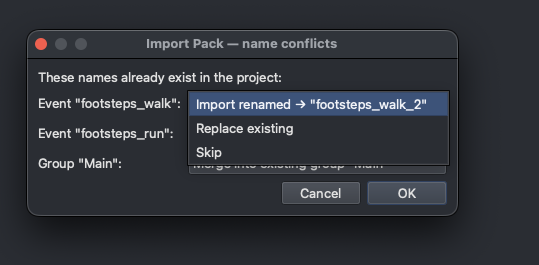
After import the events are ordinary events in your tree — reshape, remix, re-export as your own game audio.
12.3 Two design notes
- Reverb zones don't travel in packs — they're a project library (ch. 8), and your project's rooms should win. When a pack's events use a send, the pack README says so and points the buyer at ⚙ → Tools → Reverb Zones…; with no zones in the project those events simply play dry.
- Packs carry authoring, not bakes. Sample volumes, trims and loop math bake at the importing project's export, with its formats and quality. That's why packs stay editable end to end.