2. Events & Groups
2.1 What an event is
An event is the unit your game talks to. Everything else in PFA — levels, tracks, variations, fades — lives inside an event. There are two kinds:
- Music — continuous, tempo-aware, organized in intensity levels (simple mode) or as a node graph of sections and transitions (advanced mode, ch. 6). The game starts/stops it and moves it between states.
- SFX — triggered sounds: one-shots (footsteps, hits, UI) or sustained
loops (campfire, engine). The game calls
trigger()per occurrence, or creates an emitter for a positioned loop.
In game code:
PFA.play("music_forest")         # music: start the event (entry fade applies)
PFA.set_level("music_forest", 1) # music: switch intensity level
PFA.trigger("footsteps")         # sfx: play once (variations handled by PFA)
PFA.stop("music_forest")         # stop with the event's release fade
pfa.play('music_forest');
pfa.setLevel('music_forest', 1);
pfa.trigger('footsteps');
pfa.stop('music_forest');
2.2 The event tree
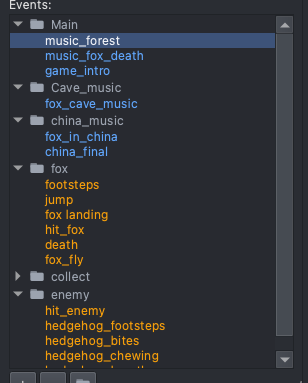
The left panel lists every event, foldered into groups (here: the Fox Run
demo — Cave_music, china_music, fox, collect, enemy). Click an
event to load it into the timeline and inspector. Clicking the event again
after working in a track always returns the inspector to Event Settings.
Below the tree:
+— add an event. You choose the type once at creation:Music (Simple),Music (Advanced)(starts with a node graph seededIntro → Loop 1 → Loop 2, ready to rewire), orSFX.−— delete the selected event.- the folder icon (tooltip Add group) — add a group.
Drag events to reorder them or drop them into a group.
2.3 The context menu
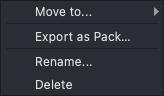
Right-click an event:
- Move to… — submenu with
(No group)and every existing group. - Export as Pack… — package this one event as a
.pfapack(ch. 12). - Rename…
- Delete
Right-click a group for Export Group as Pack…, Rename… and Delete Group (its events return to the root — they are not deleted).
2.4 Groups
Groups are folders with a mixer role: each group has its own volume,
mute and solo — visible as group headers in the event mixer (ch. 9). Use
them the way you'd use buses in a DAW: music, ui, enemies, ambience.
Group volume is exported with the config, so a game-wide "music at −6 dB" decision is an authoring decision, not a code change. Over Live Connect (ch. 10) an event's solo ducks everything else in the running game; a group's solo stays local to Studio monitoring — ch. 10 lists exactly what travels.
Groups also define the natural unit for sharing: Export Group as Pack
turns a curated group (say, Footsteps) into a single file another PFA user
can import (ch. 12).