8. Reverb Zones
Reverb in PFA is split in two: events say how much they feed the room (the send, ch. 7.5); the project owns a library of rooms — the reverb zones. The game switches the active zone as the player moves through spaces; every sending event immediately sits in the new room.
Open the library from ⚙ → Tools → Reverb Zones…
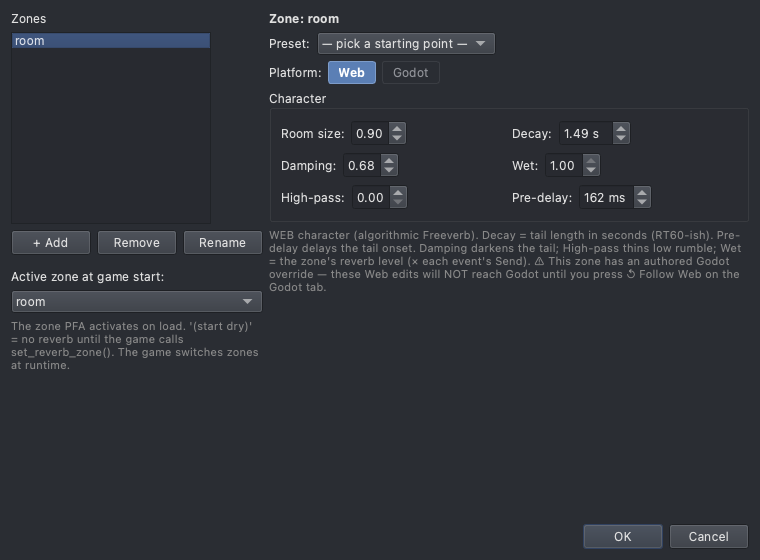
8.1 Zones
- Zones list —
+ Add,Remove,Rename. A zone is a named room character:room,cave,hangar… - Active zone at game start — which zone the engines activate on load,
or
(start dry)for no reverb until the game asks. Renaming/removing a zone keeps references tidy automatically. - Preset: — 16 I3DL2/EAX-style starting points: Dry (no reverb), Padded Cell (dead), Small Room, Bathroom (tiled), Large Stone Room, Concert Hall, Deep Cave, Arena / Stadium, Aircraft Hangar, Stone Corridor, Alley (urban), Open Forest, Open Plain / Outdoor, Parking Garage, Sewer Pipe, Underwater. Pick one, then shape it with the knobs.
8.2 The character knobs
| Knob | Range | What it does |
|---|---|---|
| Room size | 0–1 | Size of the simulated space (reflection density) |
| Decay | 0.1–12 s | Tail length, RT60-ish (Web only — see below) |
| Damping | 0–1 | High-frequency absorption; higher = darker tail |
| Wet | 0–1 | The zone's reverb level (× each event's Send on Web) |
| Dry | 0–1 | Direct-signal level (Godot tab) |
| Spread | 0–1 | Stereo width of the tail (Godot tab) |
| High-pass | 0–1 | Thins low rumble out of the tail |
| Pre-delay | 0–200 ms | Gap before the tail starts — clarity for transients (Web only) |
8.3 Web and Godot tabs
Like spatial settings (ch. 7.4), a zone has one canonical Web character
(algorithmic Freeverb) and an optional Godot override (Godot's native
AudioEffectReverb). Godot mirrors the Web values until you edit any knob
on the Godot tab — with one deliberate exception: picking any preset except
Dry seeds a Godot override immediately. The engines run different send
topologies (Web's reverb return is full-wet with per-event sends; Godot's
zone wet is the bus mix), so the preset keeps the perceived wet as a
Godot value while Web stores wet = 1.0. ↺ Follow Web removes the
override — the seeded compensation included — and re-links.
The two engines expose slightly different physics, and the dialog's hint text explains the differences as you switch tabs:
- Godot has no Decay knob — tail length rides on Room size (no RT60 parameter in the native effect).
- Godot has no Pre-delay — its native predelay is a feedback comb (tonal), not a true gap, so PFA doesn't use it.
- Godot adds native Dry and Spread knobs.
If you authored a Godot override, the Web tab warns you that Web edits no longer reach Godot — press ↺ Follow Web to re-link when you want one character again.
8.4 In the game
The exported config carries the whole library. Engines apply the start zone on load; switching is one call:
PFA.set_reverb_zone("cave")
pfa.setReverbZone('cave');
Only events with Reverb send enabled react — UI and music stay dry by default. Note that the editor preview doesn't run the reverb DSP; audition rooms in the demo games or over Live Connect (ch. 10).
One packaging note: reverb zones are a project library, so they
intentionally do not travel inside .pfapack files (ch. 12) — pack
READMEs tell the buyer to create a matching zone.