6. Advanced Mode: the Node Graph
Levels + one crossfade rule cover a lot of games. The node graph is for when music needs structure: different transitions per direction, tempo changes between sections, stingers over transitions, probability routing, intros and outros. You lay the music out as a map — sections as nodes, transitions as the roads between them — and the game just names destinations.
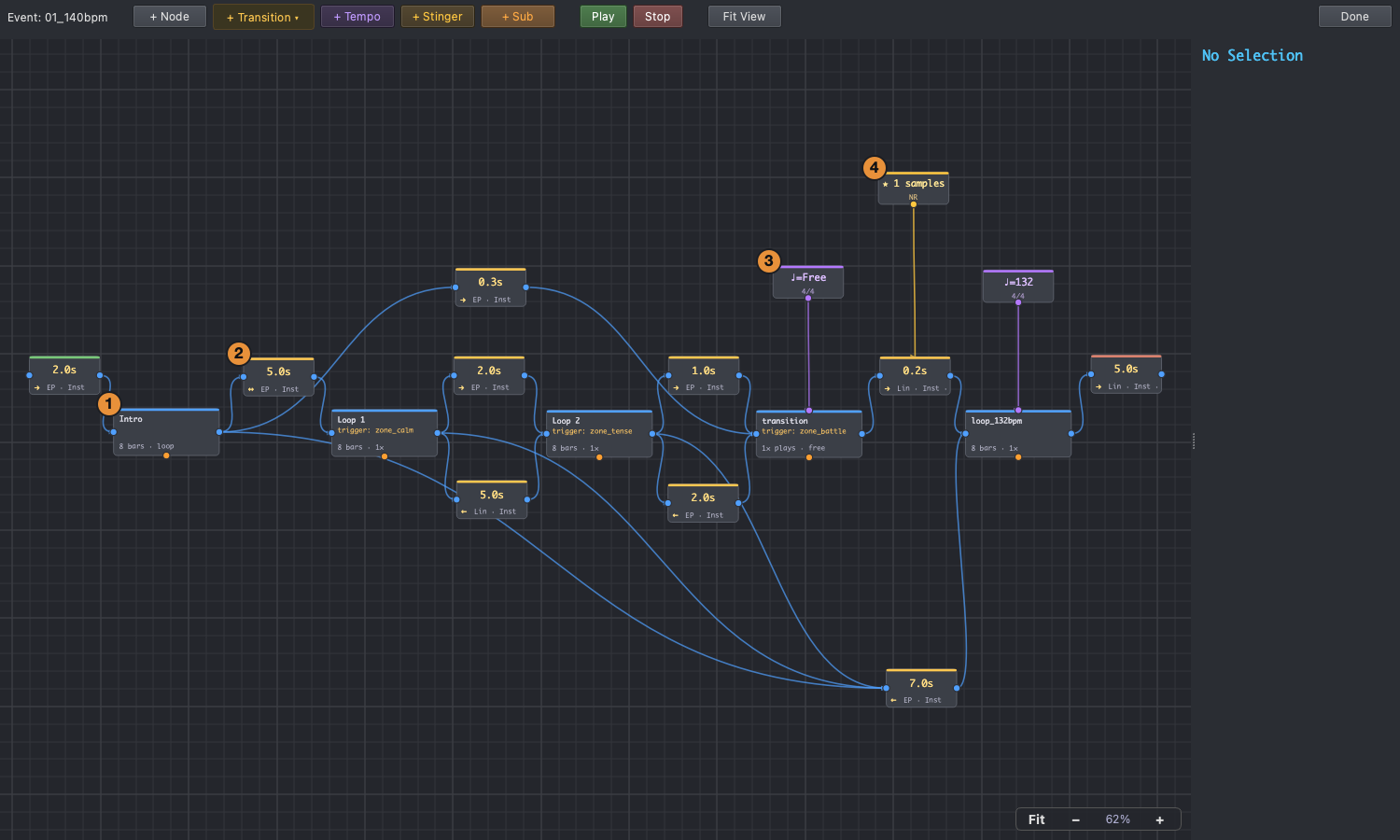
The figure shows the Adaptive Music demo: ① loop sections
(Intro → Loop 1 → Loop 2 → transition → loop_132bpm), ② transition nodes
carrying the fades, ③ tempo nodes (one ♩=Free, one ♩=132), ④ a stinger
attached to a transition. Three things to notice before the reference:
- Rises and falls are different. Each step up uses its own short transition (0.2–2 s); the falls use long ones (5–7 s). Games rise abruptly and cool down slowly — the graph makes that trivial to author.
- Transitions are reusable. Several sections route their way down through one shared 7-second fade node. Author the descent once; connect every source to it.
- Sections own their time. The
transitionsection is free-tempo (a riser with no grid);loop_132bpmruns at its own 132 BPM. The graph re-quantizes as playback crosses them.
6.1 Opening the editor
Create the event as Music (Advanced), or press the Nodes button in Event Settings on an advanced event. The window is three parts: toolbar, canvas, and a properties panel on the right that shows the selected node.
6.2 Toolbar
| Button | What it places |
|---|---|
+ Node |
A loop section |
+ Transition ▾ |
Crossfade / Fade In / Fade Out node |
+ Tempo |
A tempo override node |
+ Stinger |
A stinger (one-shot over a transition) |
+ Sub |
A sub-level under the selected section (ch. 6.7) |
Play / Stop |
Preview with live node highlighting |
Fit View |
Frame the whole graph |
Done |
Close (the graph lives in the event; save the project as usual) |
Placement is ghost-style: click the button, a translucent ghost follows the
cursor, click to drop it, right-click or Esc to cancel. The empty-canvas
right-click menu carries a placement subset — Add Section, the three
Transitions, Add Sub-level Node (plus Fit to View); tempo and stinger
nodes are placed from the toolbar.
Canvas navigation — pan with middle-drag; zoom with the bottom-right
overlay (Fit − 100% +) or the keyboard: +/= in, − out, 0 fit.
Space toggles preview. Delete a selected node or connection with
Delete/Backspace.
6.3 Loop nodes (sections)
A loop node plays one level's tracks. Its face reads like
8 bars · loop (infinite), 8 bars · 1× (plays once), or loop · free /
1× plays · free when a free-tempo node is attached.
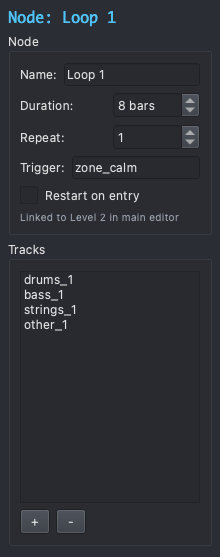
| Property | Meaning |
|---|---|
| Name | Section name shown on the node |
| Duration | Section length in bars (1–128) |
| Repeat | How many passes before the section is "done" (0 = Infinite) |
| Trigger | Trigger name the game sends via navigate() (ch. 6.8) to steer playback toward this section |
| Restart on entry | Start this section from position 0 instead of phase-synced entry. Use for hard cuts or when the section's tempo/length differs from its source |
By default entry is phase-synced (ch. 3.3): arriving mid-bar continues
the musical timeline. Restart on entry is the opt-out.
Connect sections by dragging from a node's right (output) port to another node's left (input) port — normally through a transition node.
6.4 Transition nodes
Transitions are nodes, not line properties: drop a Crossfade, Fade In or
Fade Out between two sections and wire source → transition → target.
The face shows everything at a glance — 5.0s, a direction glyph
(↔ both / → forward / ← reverse), and the details line, e.g.
EP · Inst (curve EP/Lin/S/Exp/Log · quantize Bar/Beat/Inst · A if
auto-advance · % if probability < 100).
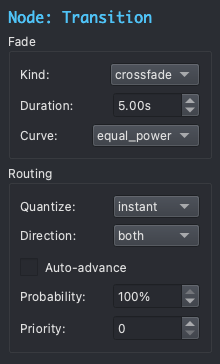
Fade group:
| Property | Values |
|---|---|
| Kind | crossfade (both sides overlap) / fade_in (new side fades in, old cuts at the boundary) / fade_out (old side fades out; new side enters clean) |
| Duration | 0–30 s |
| Curve | equal_power, linear, s_curve, exponential, logarithmic |
Routing group:
| Property | Meaning |
|---|---|
| Quantize | When the transition may start: next bar, next beat, or instant |
| Direction | both / forward / reverse — restricts which travel direction may use this transition |
| Auto-advance | Fire automatically when the source section finishes its repeats — this is how intros chain into loops |
| Probability | 0–100% — chance this route is taken when eligible |
| Priority | 0–99 — tie-breaker when several routes are eligible (higher wins) |
Quantize is per transition, and preview obeys it. A transition's own Quantize wins over the event-level Switch setting (Event Settings) — in the in-app preview and in the exported game alike; the config carries the value per connection and both engines (Web and Godot) resolve it the same way. Two rules override it on both sides: a section with Restart on entry always waits for the next bar (beat 1 at an arbitrary sample isn't a thing), and a Free tempo section has no grid to snap to, so its transitions land instantly — leaving a Free tempo section, there is no bar to wait for even into a Restart-on-entry target.
Two dangling-fade conventions round out the system:
- A
Fade Innode wired into the first section with no source = the event's entry fade. (Event Settings shows "⚠ Controlled by the node graph (entry node)" on Start fade in that case — the graph owns it.) - A
Fade Outnode hanging off a section with no target = a terminal fade: when the section finishes its repeat count, it fades to silence and the event ends musically on its own.
6.5 Tempo nodes
A tempo node hangs under a section: drag from the tempo node's bottom port
to the loop node's top port (the port turns purple). The face shows
♩=132 or ♩=Free, plus the time signature.
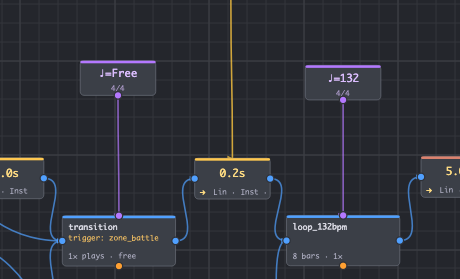
| Property | Values |
|---|---|
| BPM | 1–999 (disabled when Free is on) |
| Free | Free tempo — no bar/beat grid for this section; loops follow the clip's trimmed window (a section's repeats are counted in clip cycles, on all three players); fades run on wall-clock time |
| Time Sig | 4/4 3/4 6/8 2/4 5/4 7/8 or Custom… |
Free tempo is available only through a tempo node — the transport-bar Free box is a read-only indicator, editable here in the node graph.
Without a tempo node, a section uses the event's transport BPM / signature.
With them, one event can travel 140 BPM → free-time riser → 132 BPM — the
demo does exactly that.
6.6 Stinger nodes
A stinger is a one-shot flourish (cymbal swell, whoosh, vocal hit) fired
at the moment its transition starts — for a Crossfade or Fade In,
that is t=0 of the fade; when a Fade Out chains into a Fade In, the
stinger fires when the fade-in begins (the outgoing fade finishes first).
Drop a + Stinger, fill it with samples, and wire its bottom port to a
Crossfade or Fade In transition node. Fade Out nodes don't take
stingers: the editor refuses the wire, and refuses switching a
stinger-carrying transition's Kind to Fade Out — the reason appears
right under the Kind field. One stinger can feed several transitions —
author the flourish once, reuse it across the graph.
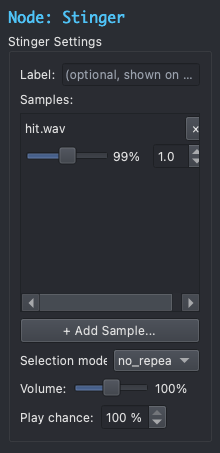
| Property | Values |
|---|---|
| Label | Optional text shown on the node (otherwise ★ N samples) |
| Samples | Any number of variants — per-sample volume and weight; drag-and-drop WAV/OGG works |
| Selection mode | random / weighted / no_repeat |
| Volume | 0–200% |
| Play chance | 0–100% per transition fire |
Double-click a stinger node to audition it (the node glows gold). Face
badges: NR/RND/WTD for the mode, plus % when play chance < 100.
6.7 Sub nodes (layered sub-levels)
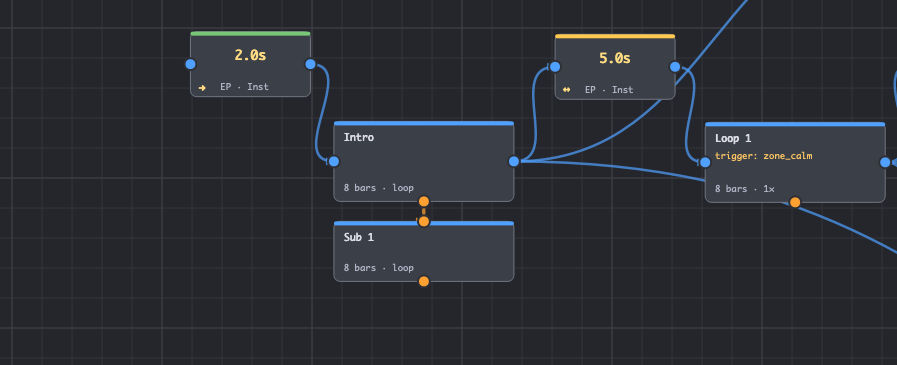
+ Sub (toolbar, or right-click a section → Add Sub-level) chains
Sub 1 → Sub 2 → … below the parent section with vertical connections.
Each sub is a layer variant of its parent (ch. 4.6): its tracks appear in
the main timeline under the parent level, and the game toggles subs at
runtime for intensity-within-the-section. In the game every section entry
starts with its subs off — after a transition, toggle the sub on again
if it should still play; the editor's preview keeps a sub's switch as you
authored it and restores it when you return to the section (ch. 9.1).
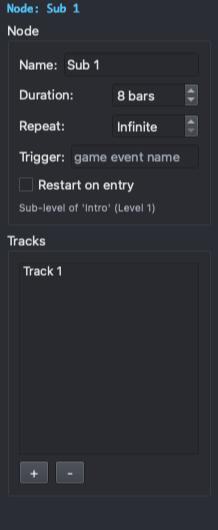
A sub's inspector mirrors a section's (duration, repeat, trigger,
restart-on-entry), names the parent it hangs under, and lists the sub's own
tracks — +/− add or remove them right from the graph.
6.8 Preview & how the game drives it
Press Play (or Space): the active section glows green and, during a
transition, the transition node glows orange — you can watch the music walk
the map. To rehearse the real thing, run your game on the exported pack —
Live Connect (ch. 10) carries your mix moves editor → game while you play.
In the game, music graphs are steered with navigate(event, trigger):
give sections trigger names (zone_calm, zone_battle), then
name the music event plus the destination — transitions are the roads
between destinations, not destinations themselves. trigger() is the SFX
call, not a music one: it starts an SFX event, which then follows its
authored Loop (ch. 7.3) — a plain event plays once, a looping event plays
until stop():
PFA.navigate("music_forest", "zone_battle") # route to the battle section
pfa.navigate('music_forest', 'zone_battle');
It returns true when the engine accepted the request. A route carrying
that trigger out of the current section is ranked with its siblings by
Priority and rolled on Probability — true means a roll passed.
With no such route, a section that carries the trigger is entered directly
and nothing is rolled: the fade settings are borrowed from the first road
leaving the current section, whichever section that road leads to, or are
the event's own when no road leaves it. false means nothing was
scheduled. true says the switch is scheduled, not that it has happened — the
node_changed signal / onNodeChanged callback marks the moment it
applies. Quantize, curves, probability, priority, stingers — all resolved
by the engine from your graph. The game names a destination; the graph
decides how to get there musically.
Subs are not destinations: the game switches a sub-level on and off with
toggle_sub_level(event, sub_name, enabled) / toggleSubLevel(event,
subName, enabled) (ch. 6.7) — an exported sub carries its name, not a
trigger, and the Trigger field is disabled on a Sub node.