11. Export for Game
Export renders the project into what ships: encoded audio files plus a
config.json the PFA engine loads. ⚙ → Export → Export for Game…
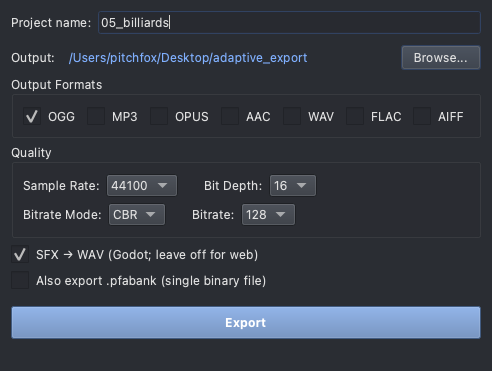
11.1 The dialog
- Project name — used inside the config metadata.
- Output — target folder (
Browse…). - Output Formats — check any of
OGG(default) /MP3/OPUS/AAC/WAV/FLAC/AIFF. Each checked format renders a complete set; OGG is the safe cross-platform default for both engines. The config (and a.pfabank) points at the first checked format — and the Godot addon decodes only OGG / MP3 / WAV (Godot 4 has no runtime decoders for the other four), so for a Godot game keep one of those three first in the list. The web engine plays whatever the browser decodes. - Quality — Sample Rate
22050 / 44100 / 48000; Bit Depth16 / 24 / 32(for PCM formats); Bitrate ModeCBR / VBR / ABRwith bitrates64–320 kbps(for lossy formats). Export quality is independent of the project preview rate (ch. 1.5). OPUS always encodes at 48 kHz — the codec accepts no other rate family; decoders resample transparently, so this is inaudible plumbing, not a quality change. - SFX → WAV (Godot; leave off for web) — see 11.3.
- Also export .pfabank (single binary file) — see 11.4.
- Export — runs with a
[current/total]progress readout and a summary when done.
Encoding is done by the ffmpeg bundled inside the app — no system installs needed. (Running from source, the editor uses the repo's ffmpeg so dev and app exports stay bit-identical.)
11.2 What gets baked
Export is not a file copy — it renders your authoring into runtime-ready assets:
- Volume baking. Sample volume × clip volume is baked into the rendered
audio (one ffmpeg volume pass), and the exported clip volume is reset to
1.0 — engines don't spend a runtime multiply, and quiet layers can't be
un-mixed by accident. Stinger samples are the exception: a stinger clip's
volume ships in
config.jsonand the engines apply it at fire time. - Trim baking. Clips play as their trimmed windows on both engines. For
a looping SFX (ch. 7.3) the window is baked into the rendered file
itself — the shipped asset is the authored loop (Godot native-loops only
whole files), and the exported clip is normalized to match. One-shot
windows ship in
config.jsonand are applied at trigger time — sample-accurate on the web engine (the window is the buffer's play length); in Godot the start is sample-accurate and the window's end lands on a frame timer (a frame late at most, released click-free). Their files stay full, so re-exports stay fast. - Loop math. Each music track's
loop_barsis computed from the clip's trimmed length at the event's own BPM — the loop boundary in the game is exactly the one you previewed (ch. 4.5). - Node graphs flatten. Tempo, transition and stinger nodes bake into an engine-ready structure (ch. 14 for the schema).
- Master volume. The master fader (ch. 9.2) ships in
config.json(written only when it is not at unity) — both engines apply it on load and re-apply it on a live reload, so the game plays exactly as loud as the mix you approved. No need to fake headroom on event faders. config.jsoncarries everything else: events, levels, fades, spatial, reverb zones, intensity curves, groups.
11.3 SFX → WAV
A Godot-specific optimization, off by default:
Export one-shot SFX as uncompressed WAV — punchy transients and no Godot native-WAV-loop click. Looping SFX and music keep the formats above. Leave OFF for web builds (WAV is far larger).
Background: Godot decodes WAV with the lowest latency (good for one-shots), but its native WAV looping has a one-frame overread bug (godotengine
119778) that clicks at the seam — so PFA routes only one-shot SFX to
WAV and keeps loops in the compressed format, which loops cleanly. For web builds leave it off; download size wins.
11.4 .pfabank
Also export .pfabank additionally packs config + all audio of the base
format into one binary file with an indexed data section. For web games
that means one HTTP request instead of dozens. Both engines hold the bank in
memory and slice entries out of it on demand; once what you need is
preloaded, the raw bank buffer can be released. Format details in the
appendix (ch. 14.3).
A bank is a shipping format: Sync never rewrites one, so a dev build you iterate on with Live Connect should load the loose folder instead (ch. 10.3).
⚠ Godot: a bank needs the addon enabled (or one export setting). Godot's
exporter ships resources plus whatever the export preset's Filters to export
non-resource files/folders names — a .pfabank is neither, so a bank sitting
in res:// reaches the editor and not the built game. The PFA addon from
0.11.1 adds banks to the export by itself; with an older addon, or with the
plugin disabled, add *.pfabank to that filter. Loose packs need nothing:
config.json ships as a resource and Godot imports OGG / MP3 / WAV. Formats
Godot has no importer for (OPUS, AAC, FLAC, AIFF) do not reach the build
either — one more reason ch. 11.1 puts OGG first for Godot targets.
11.5 Export vs Sync
Same renderer, two intents:
| Export for Game… | Sync | |
|---|---|---|
| Target | Any folder (a release build, a handoff zip) | The configured game folder |
| Formats | One or several, picked in the dialog | The project's export settings |
| When | Milestones, releases | Constantly, while iterating (pairs with Live Connect) |
Both run the same hash-incremental renderer: unchanged samples are skipped via a content-hash cache stored in the destination folder, so re-exporting to the same folder converts only what changed — and a fresh, empty folder is always a full render.
Both write the same config.json + audio layout the engines load:
PFA.load_pack("res://audio/config.json")
await pfa.loadPack('audio/config.json'); // or loadBank('audio.pfabank')
Both loaders answer true / false and never raise: input that isn't a pack
this engine can read — JSON that is not a config, a damaged bank, a config
schema newer than the engine — is refused with one error in the log, and
whatever was loaded before keeps playing.