5. Variations & Randomization
Repetition is the enemy. This chapter is everything PFA does so that the hundredth footstep doesn't sound like the first — all of it authored per track in Track Details (select a track to see it).
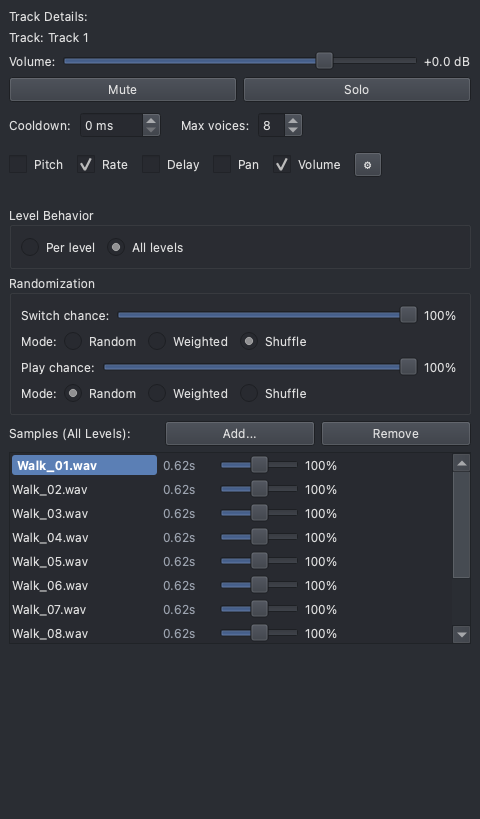
5.1 Level behavior
Two radio buttons decide where a track's samples live:
- Per level — each level has its own sample set (the footsteps demo: four surfaces × several step recordings each).
- All levels — one shared set that plays on every level (a heartbeat that persists across intensity tiers).
5.2 Variations
Samples: lists the current level's variations — add several takes of the same sound with Add…. Each row has its own volume; in Weighted mode a weight controls how often it wins the draw.
Switch chance (0–100%, double-click resets to 100) is the probability that the next cycle picks a new variation instead of keeping the current one. The switching algorithm:
- Random — uniform, repeats allowed.
- Weighted — respects per-sample weights.
- Shuffle — no-repeat bag: every variation plays once before any repeats; the musical default.
Play sample N before switching keeps a chosen variation for N cycles —
useful when a musical phrase needs to establish itself before rotating.
5.3 Play chance
Play chance (0–100%) makes a track sometimes stay silent — the core trick of generative layering: give a percussion overlay 40% and it enters and leaves organically.
- Modes: Random (true random — every roll independent), Weighted (weighted history — misses raise the odds, avoids long droughts), Shuffle (shuffle bag — a ten-slot bag holding the rounded share of hits, so every full cycle lands on the nearest 10%: 40% plays exactly 4 of 10, 25% plays 3 of 10).
- Reroll every
N— for music, how many loop cycles between dice rolls. - The ⚙ next to it opens Chance Transition: when a roll silences or un-silences the track, apply it Instant (10 ms anti-click) or as a smooth Fade (0.1–5.0 s, default 0.5 s).
Engine note. On both engines this fade plays in both directions (when a roll silences and when it un-silences the track) no matter how many variations the track has. A variation switch that lands inside the fade hands it over seamlessly — the ramp finishes on its original schedule.
Per-level playback state (ch. 3.3) means each level's bag, history and dice keep advancing even while another level is audible.
5.4 SFX per-trigger randomization
For SFX, four per-trigger randomizers vary every single trigger. Enable each dimension with its checkbox in Track Details, then set ranges in the ⚙ Randomization Settings dialog:
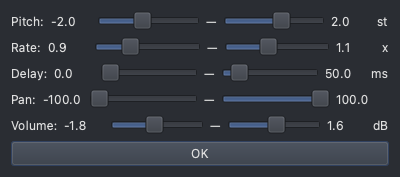
| Dimension | Range |
|---|---|
| Pitch | ±12 semitones |
| Rate | 0.5–2.0× playback speed |
| Delay | 0–500 ms pre-trigger delay |
| Volume | ±24 dB |
Each trigger rolls fresh values inside the enabled ranges — a footstep event with ±2 st pitch and ±3 dB volume never plays the same twice even with a single sample. Randomization stacks on top of variation selection, and intensity (ch. 7.6) stacks on top of both.
For smart loops (ch. 7.3), each loop cycle counts as a trigger: the seam re-rolls randomization and can rotate variations — a campfire that never audibly loops.